Platform-Specific Information
This Appendix presents the platform-dependent instructions for using GNAT Pro for Rust to build, run, and debug Rust programs.
It assumes that INSTALL_DIR is the directory in which the product has been installed.
Native Linux and Native Windows
Introduction
Native Linux and native Windows are targets which come with the Rust Standard Library consisting of:
The targets are identified by the following triples:
AdaCore triple |
Rust triple |
|---|---|
|
|
|
|
Limitations
The GNAT Pro for Rust products for native Linux and native Windows have no known limitations.
Using GNAT Pro for Rust
sudoku
Overview
We will use the sudoku example located in INSTALL_DIR/share/examples/rust/sudoku to illustrate how to use GNAT Pro for Rust.
The example demonstrates development with the Rust Standard Library, in particular the organization of source code into modules, the implementation of comparison and formatting traits, the use of simple data structures, and more. The example has the following structure:
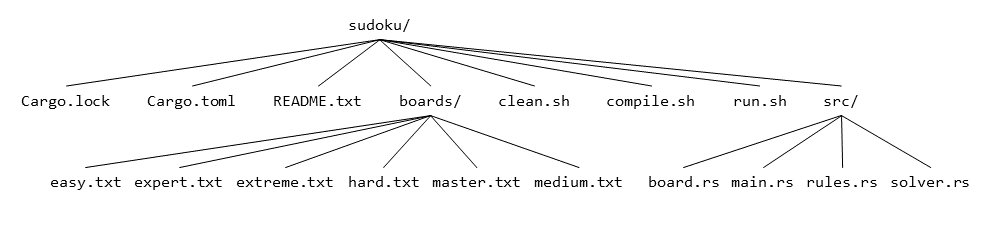
Cargo.toml is the manifest file used by cargo.
The manifest format is quite powerful as it allows you to specify the identity of your crate, its dependencies, target-specific details, profiles, workspaces, and much more.
Consult The Manifest Format for further details.
Directory boards contains sample input boards.
clean.sh, compile.sh, and run.sh are simple helper scripts which clean up the build environment, compile, and run the example, respectively.
Directory src contains the source code of the example, split into several modules.
Building
Execute the following command to build the example:
$ cargo build
cargo is the Rust package manager, the entry point of GNAT Pro for Rust. It offers an extensive set of commands and configurations. Consult Cargo Commands and Cargo Reference for further details.
Running
Execute the following command to run the example:
$ cargo run -- boards/<board_of_your_choice>
Debugging
Start rust-gdb by executing:
$ rust-gdb --args target/debug/sudoku boards/<board_of_your_choice>
Place a breakpoint on solve_one, run the program, and observe the value of parameter column at the breakpoint by executing:
(gdb) break sudoku::solver::solve_one
(gdb) run
(gdb) print column
Quit rust-gdb by executing:
(gdb) quit
mouse-in-maze
Overview
We will use the mouse-in-maze example located in INSTALL_DIR/share/examples/rust/mouse-in-maze to illustrate how to use GNAT Pro for Rust and GNAT Pro for Ada for mixed language development.
The example consists of an Ada main and a Rust library. The example has the following structure:
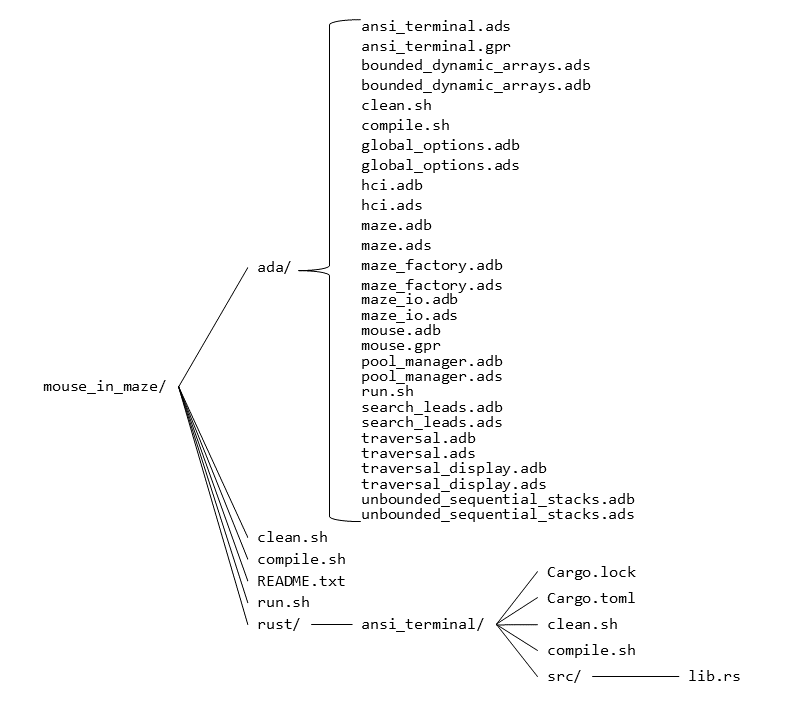
Directory ada contains the sources for the Ada main.
File ada/ansi_terminal.gpr is the GPR project for the Rust library.
File ada/mouse.gpr is the GPR project for the Ada main.
Directory rust contains the sources for the Rust library.
clean.sh, compile.sh, and run.sh are simple helper scripts which clean up the build environment, compile, and run the example, respectively.
Building
Navigate to directory INSTALL_DIR/share/examples/rust/mouse-in-maze/rust/ansi_terminal and execute the following command to build the Rust library:
$ cargo build --release
Navigate to directory INSTALL_DIR/share/examples/rust/mouse-in-maze/ada and execute the following command to build the Ada main:
$ gprbuild -P mouse.gpr --target=<target>
where <target> is x86_64-linux for native Linux and x86_64-windows64 for native Windows.
Running
Execute the following command to run the example:
$ ./mouse -w 10 -h 10
AArch64 Bare Metal
Introduction
AArch64 Bare Metal is a no_std target which comes with the following Rust libraries:
The target is identified by the following triples:
AdaCore triple |
Rust triple |
|---|---|
|
|
Limitations
GNAT Pro for Rust for AArch64 Bare Metal has no known limitations.
Using GNAT Pro for Rust
data_structures
Overview
We will use the data_structures example located in INSTALL_DIR/share/examples/rust/data_structures to illustrate how to use GNAT Pro for Rust.
This example demonstrates no_std development, in particular the use of FFI (Foreign Function Interface) to interface with C code, the definition of a global allocator in order to use heap-allocated data structures, and the handling of panics.
The example has the following structure:
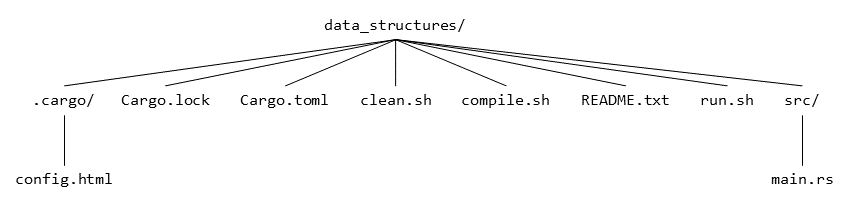
.cargo/config.toml is the configuration file used by cargo.
The configuration format allows you to set environment details, HTTP and network details, patch application specifics, define registries, and more.
Consult Configuration for further details.
Cargo.toml is the manifest file used by cargo.
The manifest format is quite powerful as it allows you to specify the identity of your crate, its dependencies, target-specific details, profiles, workspaces, and much more.
Consult The Manifest Format for further details.
clean.sh, compile.sh, and run.sh are simple helper scripts which clean up the build environment, compile, and run the example, respectively.
src/main.rs contains the source code of the example.
Prerequisites
The example is tailored for the ZynqMP BSP and GNATemulator, both distributed with GNAT Pro for Bare Metal.
You can also build the example with your own BSP and linker script, and run it within your own emulator or physical board.
Configuration
Before building the example, you will need to provide the BSP and linker script details to cargo.
Edit file INSTALL_DIR/share/examples/rust/data_structures/.cargo/config.toml and follow the instructions in the comments.
Building
Execute the following command to build the example:
$ cargo build --target=aarch64-unknown-none
cargo is the Rust package manager, the entry point of GNAT Pro for Rust. It offers an extensive set of commands and configurations. Consult Cargo Commands and Cargo Reference for further details.
Running
Assuming you are using ZynqMP BSP and GNATemulator, execute the following command to run the example:
$ aarch64-elf-gnatemu target/aarch64-unknown-none/debug/data_structures
Debugging
Debugging the example requires two terminals which we will refer to as client and server terminals.
In the server terminal, run the example by executing:
$ aarch64-elf-gnatemu -g target/aarch64-unknown-none/debug/data_structures
In the client terminal, register aarch64-elf-gdb with rust-gdb by executing:
$ export RUST_GDB=aarch64-elf-gdb
rust-gdb is a wrapper around gdb which ensures proper path resolution and substitution within the debugger.
Start rust-gdb by executing:
$ rust-gdb target/aarch64-unknown-none/debug/data_structures
Connect to the example running in the server terminal by executing:
(gdb) target remote localhost:1234
Place a breakpoint on main.rs, continue, and print the value of variable words by executing:
(gdb) break main.rs:70
(gdb) continue
(gdb) print words
Quit rust-gdb by executing:
(gdb) quit
arithmetic
Overview
We will use the arithmetic example located in INSTALL_DIR/share/examples/rust/arithmetic to illustrate how to use GNAT Pro for Rust and GNAT Pro for Ada for mixed language development.
The example consists of an Ada main and a Rust library. The example has the following structure:
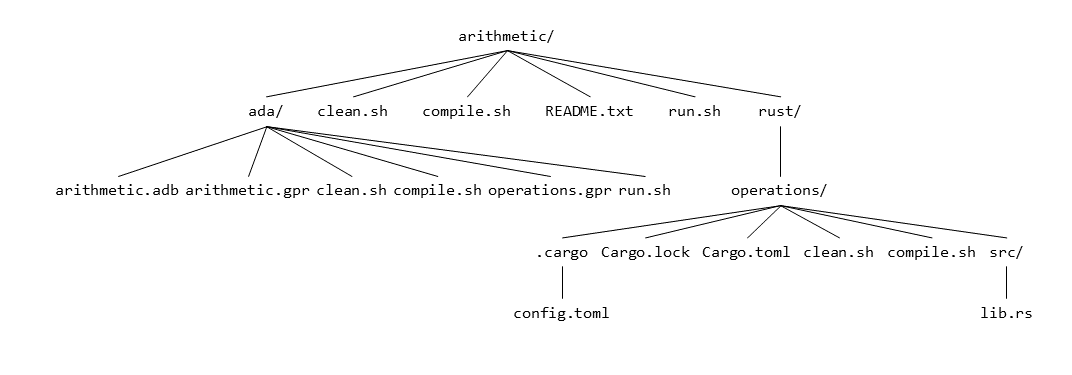
Directory ada contains the sources for the Ada main.
File ada/operations.gpr is the GPR project for the Rust library.
File ada/arithmetic.gpr is the GPR project for the Ada main.
Directory rust contains the sources for the Rust library.
clean.sh, compile.sh, and run.sh are simple helper scripts which clean up the build environment, compile, and run the example, respectively.
Prerequisites
The example is tailored for the ZynqMP BSP and GNATemulator, both distributed with GNAT Pro for Bare Metal.
You can also build the example with your own BSP and linker script, and run it within your own emulator or physical board.
Configuration
Before building the example, you will need to provide the BSP and linker script details to cargo.
Edit file INSTALL_DIR/share/examples/rust/arithmetic/rust/operations/.cargo/config.toml and follow the instructions in the comments.
In addition, you will need to specify the Ada runtime to use.
Edit file INSTALL_DIR/share/examples/rust/arithmetic/ada/arithmetic.gpr and substitute <runtime> with light-zynqmp for example.
Building
Navigate to directory INSTALL_DIR/share/examples/rust/arithmetic/rust/operations and execute the following command to build the Rust library:
$ cargo build --release --target=aarch64-unknown-none
Navigate to directory INSTALL_DIR/share/examples/rust/arithmetic/ada and execute the following command to build the Ada main:
$ gprbuild -P arithmetic.gpr
Running
Assuming you are using ZynqMP BSP and GNATemulator, execute the following command to run the example:
$ aarch64-elf-gnatemu arithmetic
AArch64 FastOS
Introduction
AArch64 FastOS is a target which comes with the Rust Standard Library consisting of:
The target is identified by the following triples:
AdaCore triple |
Rust triple |
|---|---|
|
|
Limitations
GNAT Pro for Rust for AArch64 FastOS has the following limitations:
Missing Features
The following features are either not present in GNAT Pro for Rust for AArch64 FastOS, or employ a non-functional implementation which panics or returns an error.
File System
Ownership
Feature |
Comment |
|---|---|
|
No |
|
No |
Paths
Feature |
Comment |
|---|---|
|
No |
|
No |
Symbolic links
Feature |
Comment |
|---|---|
|
No symlink support on FastOS |
|
No symlink support on FastOS |
|
No symlink support on FastOS |
Synchronization
Feature |
Comment |
|---|---|
|
No |
|
No |
Timestamps
Feature |
Comment |
|---|---|
|
No |
Vectored IO
Feature |
Comment |
|---|---|
|
No |
|
No |
|
No |
|
No |
Networking
Host lookup
Feature |
Comment |
|---|---|
|
No |
IPv6
FastOS lacks support for IPv6.
The data structures which represent an IPv6 address are present in the Rust Standard Library since they do not depend on FastOS libc.
Socket options
Feature |
Comment |
|---|---|
|
No |
|
No |
|
No |
|
No |
|
No |
|
No |
|
No |
|
No |
|
No |
|
No |
UNIX sockets
Feature |
Comment |
|---|---|
|
No UNIX sockets on FastOS |
Processes
Exit codes
Feature |
Comment |
|---|---|
|
No |
|
No |
|
No |
Known Issues
The path returned by
std::env::current_exemay be relative, depending on the value ofargv[0].std::f32::gammaandstd::f64::gammareturn+INFinstead of-INFfor-0.0.Using
std::fs::File::set_lento truncate a file to a smaller length, then writing to the file without changing the cursor will not fill the intermediate characters with zeroes.std::net::UdpSocket::peer_addrreturns the0.0.0.0address instead ofstd::io::ErrorKind::NotConnectedif no peer is connected to the socket.std::process::Command::spawndoes not function properly.Building shared libraries is not supported.
Backtraces are not symbolized when unwinding during a panic.
Missing stack overflow handler.
Using GNAT Pro for Rust
sudoku
Overview
We will use the sudoku example located in INSTALL_DIR/share/examples/rust/sudoku to illustrate how to use GNAT Pro for Rust.
The example demonstrates development with the Rust Standard Library, in particular organization of source code into modules, implementation of comparison and formatting traits, use of simple data structures, and more. The example has the following structure:
Cargo.toml is the manifest file used by cargo.
The manifest format is quite powerful as it allows you to specify the identity of your crate, its dependencies, target-specific details, profiles, workspaces, and much more.
Consult The Manifest Format for further details.
Directory boards contains sample input boards.
clean.sh, compile.sh, and run.sh are simple helper scripts which clean up the build environment, compile, and run the example, respectively.
Directory src contains the source code of the example, split into several modules.
Prerequisites
Ensure that the AArch64 FastOS kernel installed, and that ENV_PREFIX points to the directory which contains it.
Building
Execute the following command to build the example:
$ cargo build --target=aarch64-thales-fastos
cargo is the Rust package manager, the entry point of GNAT Pro for Rust. It offers an extensive set of commands and configurations. Consult Cargo Commands and Cargo Reference for further details.
Running
Assuming you are using a physical board, first copy the executable from INSTALL_DIR/share/examples/rust/sudoku/target/aarch64-thales-fastos/debug/sudoku to your board.
In addition, copy a few sudoku boards from directory boards to your board.
Execute the following command to run the example:
$ ./sudoku <board_of_your_choice>
Debugging
Debugging the example requires two terminals which we will refer to as client and server terminals.
Assuming you are using a physical board which is already provisioned with a gdb server, start the server terminal on the physical board. In the server terminal, run the example by executing:
$ <gdb-server> :1234 --args sudoku <board_of_your_choice>
where gdb-server is your gdb server executable.
In the client terminal, register aarch64-thales-fastos-gdb with rust-gdb by executing:
$ export RUST_GDB=aarch64-thales-fastos-gdb
rust-gdb is a wrapper around gdb which ensures proper path resolution and substitution within the debugger.
Start rust-gdb by executing:
$ rust-gdb target/aarch64-thales-fastos/debug/sudoku
Connect to the example running in the server terminal by executing:
(gdb) target remote <physical_board_address>:1234
Place a breakpoint on solve_one, continue, and observe the value of parameter column by executing:
(gdb) break sudoku::solver::solve_one
(gdb) continue
(gdb) print column
Quit rust-gdb by executing:
(gdb) quit
mouse-in-maze
Overview
We will use the mouse-in-maze example located in INSTALL_DIR/share/examples/rust/mouse-in-maze to illustrate how to use GNAT Pro for Rust and GNAT Pro for Ada for mixed language development.
The example consists of an Ada main and a Rust library. The example has the following structure:
Directory ada contains the sources for the Ada main.
File ada/ansi_terminal.gpr is the GPR project for the Rust library.
File ada/mouse.gpr is the GPR project for the Ada main.
Directory rust contains the sources for the Rust library.
clean.sh, compile.sh, and run.sh are simple helper scripts which clean up the build environment, compile, and run the example, respectively.
Prerequisites
Ensure that the AArch64 FastOS kernel installed, and that ENV_PREFIX points to the directory which contains it.
Configuration
Before building the example, edit file INSTALL_DIR/share/examples/rust/mouse-in-maze/ada/mouse.gpr and change x86_64-linux to aarch64-fastos.
Building
Navigate to directory INSTALL_DIR/share/examples/rust/mouse-in-maze/rust/ansi_terminal and execute the following command to build the Rust library:
$ cargo build --release --target=aarch64-thales-fastos
Navigate to directory INSTALL_DIR/share/examples/rust/mouse-in-maze/ada and execute the following command to build the Ada main:
$ gprbuild -P mouse.gpr
Running
Assuming you are using a physical board, first copy the executable from directory INSTALL_DIR/share/examples/rust/mouse-in-maze/ada to your board.
Execute the following command to run the example:
$ ./mouse -w 10 -h 10
AArch64 Linux
Introduction
AArch64 Linux is a target which comes with the Rust Standard Library consisting of:
The target is identified by the following triples:
AdaCore triple |
Rust triple |
|---|---|
|
|
Limitations
GNAT Pro for Rust for AArch64 Linux has no known limitations.
Using GNAT Pro for Rust
sudoku
Overview
We will use the sudoku example located in INSTALL_DIR/share/examples/rust/sudoku to illustrate how to use GNAT Pro for Rust.
The example demonstrates development with the Rust Standard Library, in particular organization of source code into modules, implementation of comparison and formatting traits, use of simple data structures, and more. The example has the following structure:
Cargo.toml is the manifest file used by cargo.
The manifest format is quite powerful as it allows you to specify the identity of your crate, its dependencies, target-specific details, profiles, workspaces, and much more.
Consult The Manifest Format for further details.
Directory boards contains sample input boards.
clean.sh, compile.sh, and run.sh are simple helper scripts which clean up the build environment, compile, and run the example, respectively.
Directory src contains the source code of the example, split into several modules.
Prerequisites
Ensure that the AArch64 Linux system libraries are installed, and that ENV_PREFIX points to the directory which contains them.
Building
Execute the following command to build the example:
$ cargo build --target=aarch64-unknown-linux-gnu
cargo is the Rust package manager, the entry point of GNAT Pro for Rust. It offers an extensive set of commands and configurations. Consult Cargo Commands and Cargo Reference for further details.
Running
Assuming you are using a physical board, first copy the executable from INSTALL_DIR/share/examples/rust/sudoku/target/aarch64-unknown-linux-gnu/debug/sudoku to your board.
In addition, copy a few sudoku boards from directory boards to your board.
Execute the following command to run the example:
$ ./sudoku <board_of_your_choice>
Debugging
Debugging the example requires two terminals which we will refer to as client and server terminals.
Assuming you are using a physical board, first copy INSTALL_DIR/bin/aarch64-linux-gnu-gdbserver to your board.
Start the server terminal on the physical board. In the server terminal, run the example by executing:
$ aarch64-linux-gnu-gdbserver :1234 --args sudoku <board_of_your_choice>
In the client terminal, register aarch64-linux-gnu-gdb with rust-gdb by executing:
$ export RUST_GDB=aarch64-linux-gnu-gdb
rust-gdb is a wrapper around gdb which ensures proper path resolution and substitution within the debugger.
Start rust-gdb by executing:
$ rust-gdb target/aarch64-unknown-linux-gnu/debug/sudoku
Connect to the example running in the server terminal by executing:
(gdb) target remote <physical_board_address>:1234
Place a breakpoint on solve_one, continue, and observe the value of parameter column by executing:
(gdb) break sudoku::solver::solve_one
(gdb) continue
(gdb) print column
Quit rust-gdb by executing:
(gdb) quit
mouse-in-maze
Overview
We will use the mouse-in-maze example located in INSTALL_DIR/share/examples/rust/mouse-in-maze to illustrate how to use GNAT Pro for Rust and GNAT Pro for Ada for mixed language development.
The example consists of an Ada main and a Rust library. The example has the following structure:
Directory ada contains the sources for the Ada main.
File ada/ansi_terminal.gpr is the GPR project for the Rust library.
File ada/mouse.gpr is the GPR project for the Ada main.
Directory rust contains the sources for the Rust library.
clean.sh, compile.sh, and run.sh are simple helper scripts which clean up the build environment, compile, and run the example, respectively.
Prerequisites
Ensure that the AArch64 Linux system libraries are installed, and that ENV_PREFIX points to the directory which contains them.
Building
Navigate to directory INSTALL_DIR/share/examples/rust/mouse-in-maze/rust/ansi_terminal and execute the following command to build the Rust library:
$ cargo build --release --target=aarch64-unknown-linux-gnu
Navigate to directory INSTALL_DIR/share/examples/rust/mouse-in-maze/ada and execute the following command to build the Ada main:
$ gprbuild -P mouse.gpr --target=aarch64-linux
Running
Assuming you are using a physical board, first copy the executable from directory INSTALL_DIR/share/examples/rust/mouse-in-maze/ada to your board.
Execute the following command to run the example:
$ ./mouse -w 10 -h 10