3. Developing Mixed Language Projects
With a GNAT Pro for Ada subscription, you can use the gprbuild tool in GNAT Pro for Rust to create applications that combine Ada and Rust.
This chapter illustrates how to write a program with an Ada main procedure that invokes Rust functions from static and dynamic library crates.
Combining Ada and Rust involves using a C interface on the Ada side and the std::ffi or core::ffi (Foreign Function Interface) module in the Rust code.
This section is specific to native Linux and native Windows.
For instructions on building and running mixed language projects that execute on no_std targets or require cross-compilation, please see Platform-Specific Information.
3.1. Current Limitations
This version of GNAT Pro for Rust covers only the use case of an Ada main with Rust libraries. Future versions should offer complete mixed language support, including support for a Rust main with Ada libraries.
3.2. Ada Main with Rust Library
We will start by creating a Rust library and an Ada main, which will output the greetings Hello from Rust! and Hello from Ada!, respectively.
The directory structure we are about to create is not mandatory for mixed language development. It simply illustrates the division of the source code across languages.
In a directory of your choice, create the following directory structure:
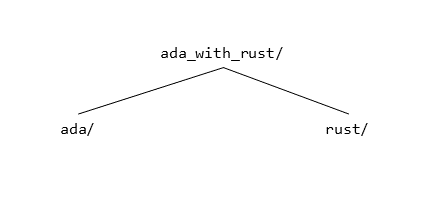
3.2.1. Rust Library
3.2.1.1. Creating
Navigate to directory ada_with_rust/rust and execute:
$ cargo new --lib hello_from_rust
By default, the cargo new --lib command will create a package for an rlib (Rust static library) that adds two numbers.
The command should create directory hello_from_rust with the following contents:
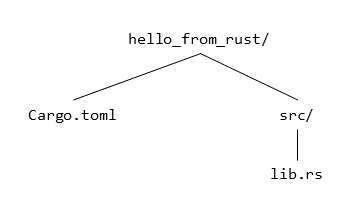
Cargo.tomlis the manifest file used by cargo.src/lib.rscontains the source code of the library.
However, an rlib is not suitable for mixed language development.
To convert the library into either a cdylib (native dynamic library) or a staticlib (native static library), edit file Cargo.toml as follows:
[package]
name = "hello_from_rust"
version = "0.1.0"
edition = "2021"

[lib]
crate-type = ["staticlib"]

[dependencies]
The crate-type property indicates the package kind.
Consult The Manifest Format for further details.
Edit file src/lib.rs as follows:
#[no_mangle]
pub extern "C" fn hello_from_rust() {
    println!("Hello from Rust!");
}
Functions that are intended for use by other languages through the C ABI must be subject to attribute #[no_mangle] and marked as extern "C".
Attribute #[no_mangle] causes the related item to be publicly exported from the produced library or object file.
ABI specification extern "C" indicates that the related item uses the C ABI.
Consult Foreign Function Interface for further details.
3.2.1.2. Building
To build the Rust library, execute:
$ cargo build --release
The command should terminate successfully with output similar to the following:
Compiling hello_from_rust v0.1.0 (<path/to/program>)
Finished release [optimized] target(s) in <time>
Command line argument --release is mandatory for mixed-language development in this version of GNAT Pro for Rust.
3.2.2. Ada Main
3.2.2.1. Creating
Navigate to directory ada_with_rust/ada, and create file hello_from_rust.gpr with the following content:
library project Hello_From_Rust is

   for Languages use ("Rust");
   for Library_Name use "hello_from_rust";
   for Library_Dir use Project'Project_Dir & "../rust/" & Project'Library_Name;
   for Source_Dirs use (Project'Library_Dir & "/src");
   for Externally_Built use "true";

   package Naming is
      for Body_Suffix ("Rust") use ".rs";
   end Naming;

end Hello_From_Rust;
Each Rust library must have exactly one corresponding GPR project in this version of GNAT Pro for Rust.
The Rust library project must be configured as follows:
Attribute
Library_Namemust be the same as the name of the Rust package.Attribute
Library_Dirmust indicate the path to the Rust package, aka the package root.Attribute
Source_Dirsmust indicate the source directory within the package root.Attributes
LanguagesandExternally_Builtmust be present, with the values shown above.
Create file hello_from_ada.gpr with the following content:
with "hello_from_rust.gpr";

project Hello_From_Ada is

   for Languages use ("Ada");
   for Object_Dir use "obj";
   for Exec_Dir use ".";

   for Main use ("hello_from_ada.adb");

   for Target use "<target>";

end Hello_From_Ada;
where
<target>isx86_64-linuxon native Linux andx86_64-windows64on native Windows.
The Ada main project must be configured as follows:
The project must “with” each Rust library project.
Attribute
Targetmust indicate the compilation target.
Create file hello_from_ada.adb with the following content:
with Ada.Text_IO; use Ada.Text_IO;

procedure Hello_From_Ada is
   procedure Hello_From_Rust with Import, Convention => C;

begin
   Put_Line ("Hello from Ada!");
   Hello_From_Rust;

end Hello_From_Ada;
3.2.2.2. Building
To build the Ada main for Linux, execute:
$ gprbuild -P hello_from_ada.gpr
When building for Windows, it is currently necessary to add a few linker flags; future versions of GNAT Pro for Rust will remove this need. With the current version of the product, execute:
$ gprbuild -P hello_from_ada.gpr -largs -ladvapi32 -lbcrypt \
    -lgcc -lgcc_eh -lkernel32 -lmingw32 -lmingwex -lmsvcrt \
    -lntdll -luser32 -luserenv -lws2_32
The command should terminate successfully with output similar to the following:
Setup
   [mkdir]        object directory for project Hello_From_Ada
Compile
   [Ada]          hello_from_ada.adb
Bind
   [gprbind]      hello_from_ada.bexch
   [Ada]          hello_from_ada.ali
Link
   [link]         hello_from_ada.adb
3.2.2.3. Running
To run the Ada main, execute:
$ ./hello_from_ada
The command should terminate successfully with output similar to the following:
Hello from Ada!
Hello from Rust!