IDE 2027.0 Release Notes
This release brings new features and important fixes to GNAT Studio and the Ada & SPARK VS Code extension.
Scenario View in VS Code
The Ada & SPARK VS Code extension now provides a Scenario view in the Explorer sidebar. It displays the scenario (external) variables declared in the loaded GPR project tree and their currently resolved values.
Click a variable to edit its value. For typed variables, this is a drop-down showing allowed values; for untyped variables this is a text field. Changes are saved to the ada.scenarioVariables setting,
and the project and predefined tasks are updated automatically. The Reset to
Default action clears a workspace override, allowing the remaining
configuration sources to take effect. Conflicting variable types are indicated
with a warning.
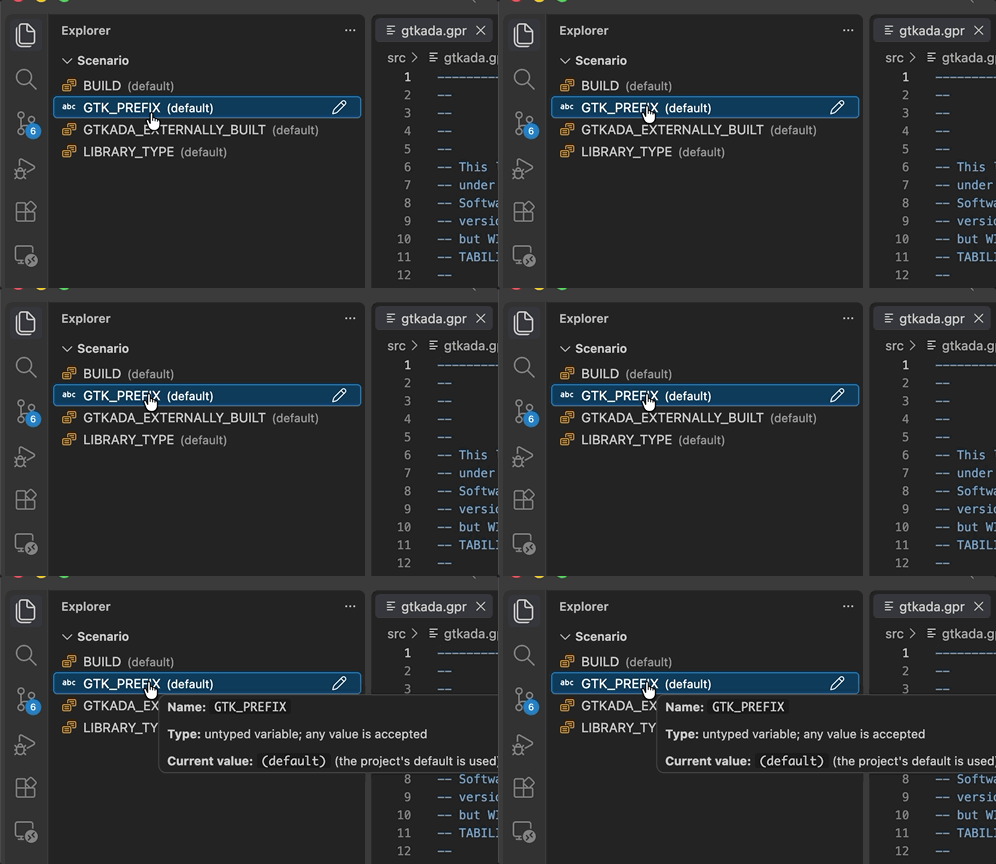
For more information, see the Scenario View section of the Ada & SPARK VS Code extension User’s Guide.
Project Navigation in VS Code
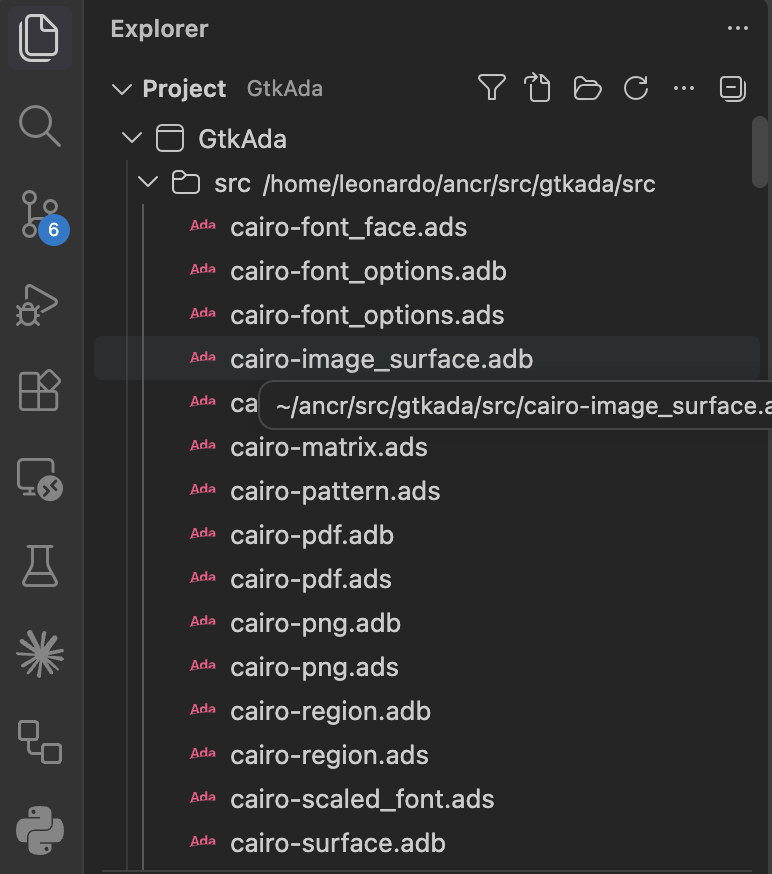
The new Ada: Go to File in Project... command opens a searchable list of
source files from the loaded GPR project, including sources outside the workspace
folders. Search by file, directory or project name, then open a file or reveal it
in the Project view. The command is available from the Command Palette and
the Project view toolbar, with the shortcut Ctrl+Alt+P (Cmd+Alt+P on
macOS). Runtime sources are included when
ada.projectView.showRuntimeFiles is enabled.
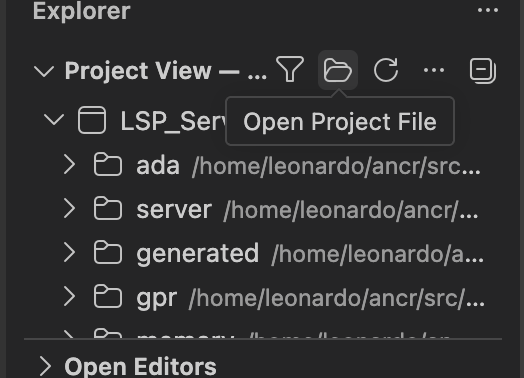
The project selection command is now named Ada: Open Project.... It opens
a picker for a GPR file and reloads the project,
which becomes the default loaded project for this workspace.
This command is also accessible from the Project view toolbar.
In Ada files, Shift+F12 now displays Find All References results in
VS Code’s References view. Navigate the results with F4 and
Shift+F4, and rerun previous searches from the view’s history. The history
is retained for the duration of the VS Code session.
For more information, see the Project View section of the Ada & SPARK VS Code extension User’s Guide.
GNATcoverage in VS Code
The new Ada: Run GNATcoverage analysis... command runs a complete
instrumentation-based coverage workflow on a main program selected from the
loaded project: instrument the sources, build the instrumented project, run the
program and generate a coverage report in the project’s object directory.
The command is also available from the editor toolbar.
Run the ada: GNATcoverage - Setup runtime library task once beforehand.
After the analysis, use ada: GNATcoverage - Load an existing coverage report
to display the results. The instrumentation, build and report generation steps
are also available as individual tasks, allowing you to define your own workflow using these as building blocks.
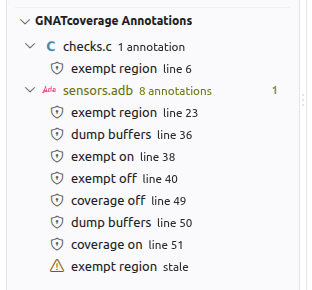
The extension now displays GNATcoverage external annotations directly in the
editor, including coverage exemptions, coverage enable/disable annotations and
buffer dump/reset annotations. Annotation files are designated by the
Coverage'External_Annotations project attribute.
Use Ada: GNATcoverage - Create external annotation to add an annotation
at the cursor or on selected code. The new GNATcoverage Annotations view lists
the project’s annotations and provides a delete action. Editor highlighting can
be controlled through the setting ada.externalAnnotations.showInEditor.
For more information about the coverage workflow, see the GNATcoverage section of the Ada & SPARK VS Code extension User’s Guide.
Coverage Percentages in GNAT Studio
GNAT Studio’s Coverage Report now uses the coverage obligation counts and percentages reported by GNATcoverage. File and project figures reflect the applicable criterion, such as statement, decision or MC/DC coverage, and labels and tooltips identify how each percentage was calculated. Project totals are aggregated from obligation counts for criteria reported by all contributing files.
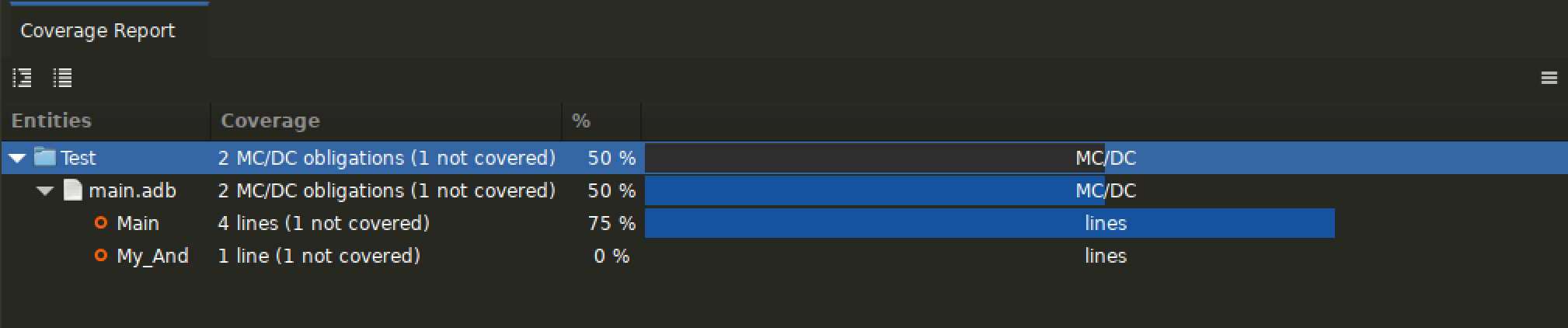
Subprogram rows remain based on line coverage. Older reports without obligation counts continue to use line-based percentages.
SARIF Quick Fixes
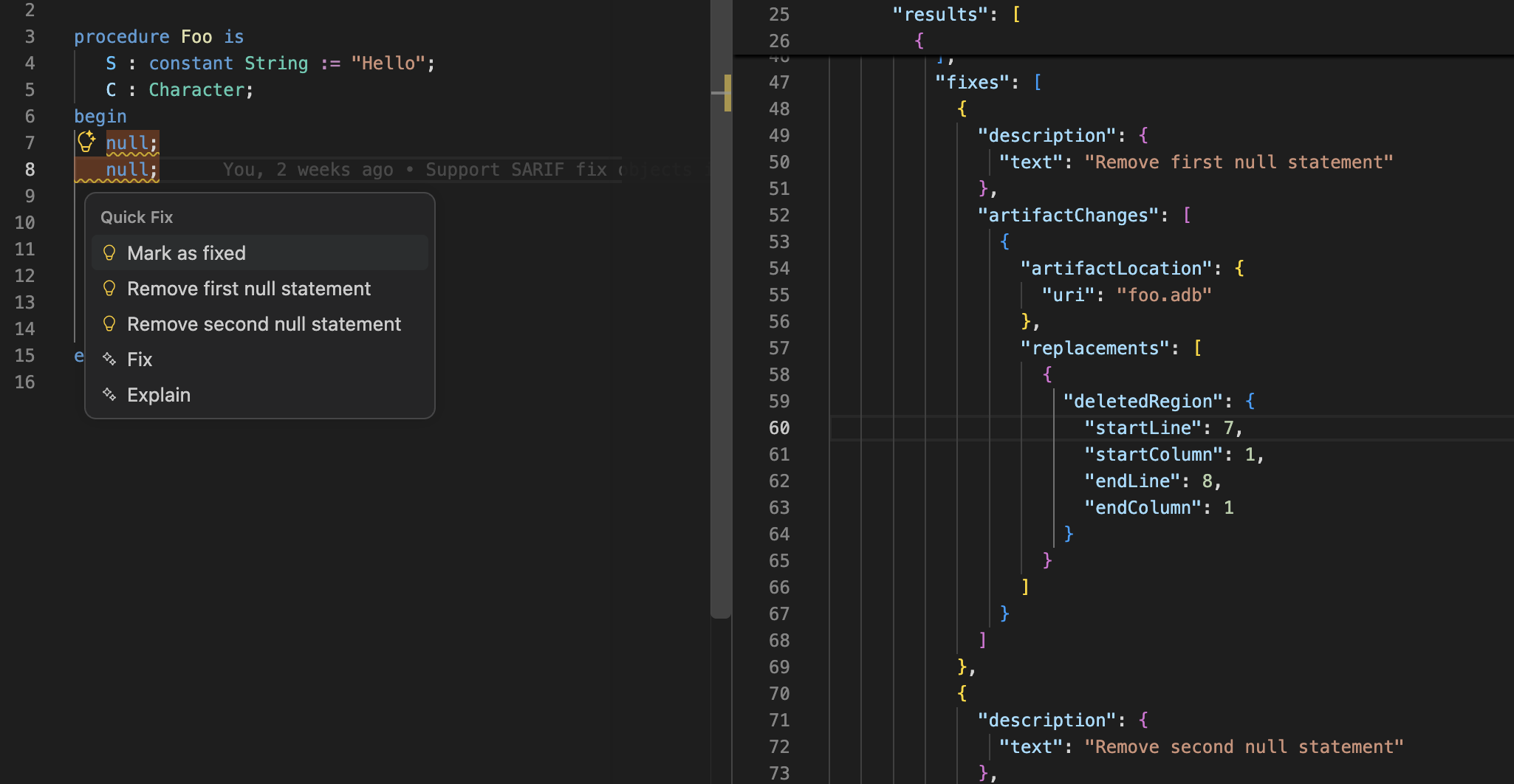
GNAT Studio now supports fixes embedded in SARIF reports. Diagnostics with a suggested fix provide an action to apply it directly. When several fixes are available, a picker shows the alternatives with a preview highlighting inserted and removed code. Fixes can affect multiple files, and you can review the proposed code changes before applying them.
In VS Code, fixes supplied by tools in SARIF reports are available as quick fixes in the editor and the Problems view through the third-party SARIF Viewer extension.
GNATformat Integration
GNAT Studio now uses GNATformat via the Ada Language Server as the default Ada formatter. GNATformat also takes GNAT Studio’s keyword and identifier casing preferences into account. The Editor/Ada preferences page provides a link to the documentation for configuring GNATformat via the project’s Format package.
Range formatting now offers three choices in both GNAT Studio and VS Code: indent only, format
only the selected lines, or format the selection together with surrounding code
needed to produce a consistent result. In GNAT Studio, use the Action on range
formatting preference under Editor/Ada, with the range formatter set to
LSP. In VS Code, use ada.rangeFormatting.formatChoice, with values
indentOnly, narrow or full (the default is full).
Range formatting can still fall back to the legacy indenter for incomplete code.
GNATformat Configurability
GNATformat now offers more control over the layout and casing of Ada code:
Built-in layouts: select
defaultortallwith--layout. The tall layout favors a vertical presentation of constructs such as subprogram parameter lists.Custom layout rules: use
--override-layoutwith one or more JSON files to customize the formatting of individual Ada constructs, for example to force parameter lists onto multiple lines.Casing controls:
--keyword-casingpreserves keyword casing or converts it to lower or upper case.--identifier-casingcan preserve identifier casing, use lower, upper or mixed case, or match the spelling of each identifier’s declaration withdefinition. Providing a project with-Penables declaration lookup across source files.
These controls are also available as attributes in the project’s Format
package. Attributes can be indexed by "Ada" to apply to all Ada sources,
or by a source file name to configure individual files. For example:
package Format is
   for Layout ("Ada") use "tall";
   for Override_Layout ("Ada") use ("formatting.json");
   for Keyword_Casing ("Ada") use "lower";
   for Identifier_Casing ("Ada") use "definition";
end Format;
The formatting.json file can contain an override such as:
{
  "node_configs": {
    "ParamSpecList": {
      "table": { "must_break": true },
      "sep": "recurse"
    }
  }
}
Command-line options take precedence over project settings. The layout and keyword casing can also be selected directly when invoking the formatter:
gnatformat -P app.gpr --layout=tall --override-layout=formatting.json --keyword-casing=lower
See the GNATformat configuration guide and the section Unparsing configuration file format for details.
Alire Improvements
GNAT Studio now loads Alire crates in the background, keeping the IDE responsive while Alire sets up the toolchain and dependencies. Progress is displayed in the Messages view, and the task can be monitored or interrupted from the Task Manager. The project automatically reloads when the setup is complete. If the setup fails or is interrupted, the previously loaded project and its environment are retained.
In VS Code, editing alire.toml now provides completion for property names,
including table and nested properties, and hover documentation for supported
properties. The project status message also gives clearer feedback about Alire
project loading.
GPR Editing Improvements
GPR keyword completion in both IDEs now takes the syntactic context into account, including project qualifiers, declarations and case constructs. Completion proposals inside case branches exclude declarations that are not valid there.
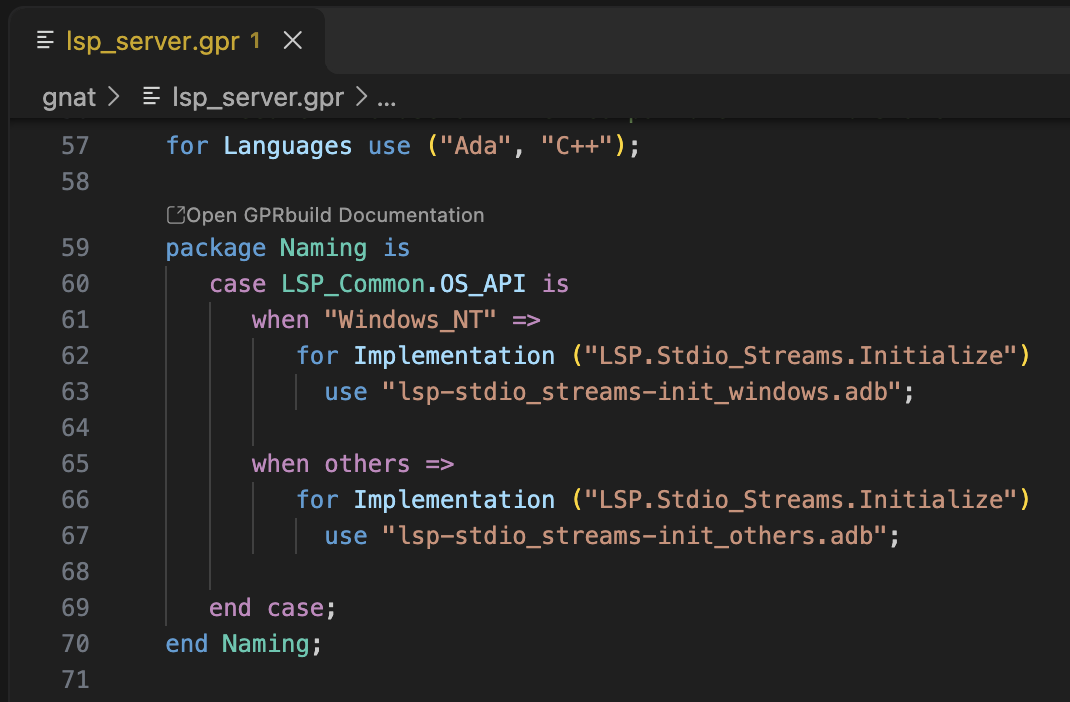
The Ada & SPARK VS Code extension adds documentation CodeLenses above GPR package declarations. These open the relevant documentation for Prove, Analyzer and Coverage, using installed documentation when available and online documentation otherwise. Other packages link to the GPRbuild documentation.
GNATdoc
GNATdoc, the Ada documentation generator, now supports Markdown fenced code blocks in documentation comments. Delimit examples with at least three backticks or tildes to render them as code blocks in HTML, RST and ODF output:
procedure Initialize;
--  Initialize application state.
--
--  ```
--  Initialize;
--  ```
Code blocks are treated as Ada code; a language label on the opening fence is ignored.
Several documentation-generation and lookup issues have also been addressed:
Generating public documentation no longer crashes when a package’s private part contains a nested generic package.
Missing-documentation warnings now correctly check generic formal parameters, including the parameters and return descriptions of formal subprograms.
RST output preserves
not nullqualifiers on anonymous access types and correctly renders type descriptions containing spaces.Documentation lookup used by IDE tooltips now handles entry bodies, entry family indices, and separate package, task and protected bodies. Task declarations and synthetic character literals are also handled more reliably.
Important Fixes
GNAT Studio
Unicode editing fixes address completion near UTF-8 prefixes, paragraph refilling, character deletion and undo/redo with multibyte characters.
Search and replace fixes address multiline regular expressions, empty matches, replacement positions, backward searches and highlighting.
GDB debugging fixes improve the handling of UTF-8 text and multiline enumeration type descriptions. The
--debug="program arg1 arg2"command line now handles program arguments more reliably with the GDB debugger. With the DAP debugger, these arguments are ignored and an error is reported in the Messages view.SARIF diagnostics now obtain their severity correctly from rule defaults, and duplicate fix proposals have been removed.
Navigation proposal menus now close when clicking outside them. Project view tooltips and changing a file’s language in File Properties are more reliable.
SPARK contextual menus use the open editor’s analysis to identify the current subprogram, improving responsiveness.
The GNATfuzz integration has been updated for the current command line and harness layout, including locating harnesses for debugging and decoding test cases, and clearing stale results when switching projects.
GNAT Studio and VS Code
Renaming a subprogram without a body, including an imported subprogram, no longer crashes the language server.
Navigation and completion in extended projects have been corrected, and project membership checks are cached to reduce repeated work.
Comments following a dot in an Ada name are handled correctly during completion and navigation.
Document tracking is more robust when files change during background analysis, and Outline view handling has been corrected in GNAT Studio.
Document highlighting now stays within the current file when an entity’s declaration is in another file.
VS Code commands now handle absolute paths in
ada.projectFile, and the Project view updates when its display settings change.Coverage report loading avoids matching GNATcoverage’s generated instrumentation sources instead of the original files.
Syntax and semantic highlighting distinguish the
nullkeyword in constructs such asnull recordfromnullused as a literal value.